Basics for Beginners
This guide explains the fundamental concepts behind Klipper's configuration system. If you're already familiar with Klipper, you can skip this and go directly to the next page.
What are Configuration Files?
FreeDi uses Klipper firmware, which stores its settings in text files instead of compiled firmware. This approach has several advantages:
- Easy customization – Edit a text file instead of recompiling and flashing firmware
- Version control friendly – Track changes over time, share your configurations easily
- Human readable – You can understand what each setting does by reading the file
- Safe experimentation – Test changes without permanent modifications
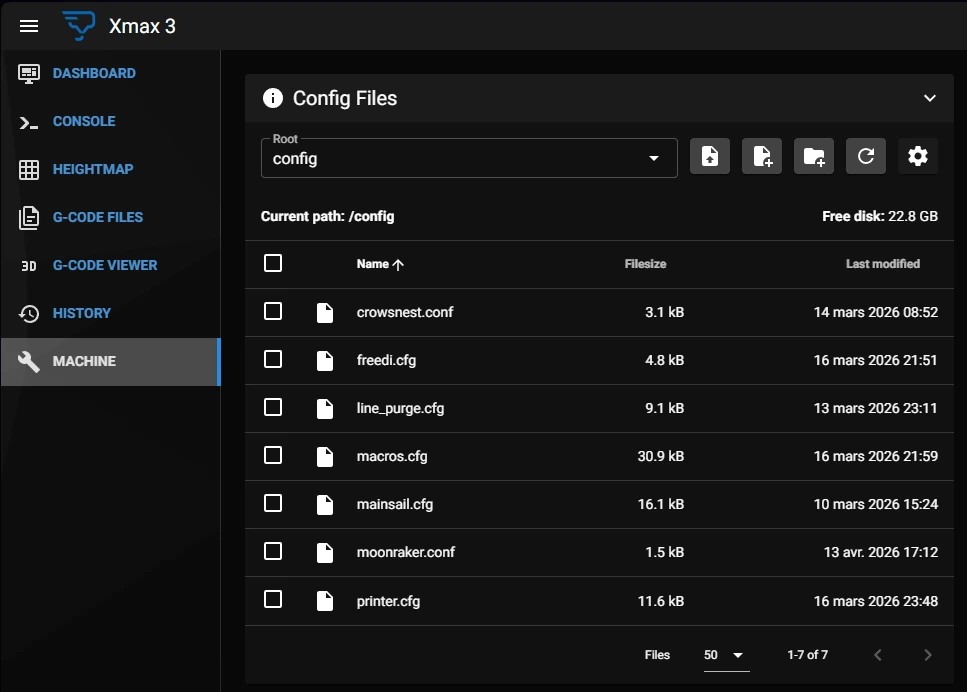
In Mainsail, the configuration files are located here:
How Configuration Files Work
Understanding this concept is crucial for working with FreeDi and Klipper:
The Startup Process
- Services start – Klipper, FreeDi, and other services boot up
- Files are read – The services read their configuration file from disk
- Settings are loaded – the configuration is applied
- Services operate – The programs run with these settings until stopped
Why a restart is Required
Configuration files are only read at startup. This means:
- ✅ Editing a file → Changes are saved to disk
- ❌ Not restarting → Running services don't know about changes
- ✅ Restarting → Services read the updated files and applies the changes
The workflow:
flowchart TD

    U[User edits config] --> A[saves file]

    A --> B{restart Service?}

    B -->|No| X[config is not read]
    X --> C[old config is active]

    B -->|Yes| D[service starts]
    D --> F[reads config]
    F --> G[applies settings]
    G --> H[new config is active]

    P[Service]

    C --> P
    H --> P
Real-world analogy:
Think of it like updating a recipe book. You can write new instructions in the book (editing the configuration), but the chef (service) only reads the recipe when starting to cook (startup). To use the new recipe, the chef needs to start a new dish (restart).
Klipper Configuration Syntax
Klipper uses a simple "INI-style" format that is easy to read and edit:
Basic Structure
[section_name]
parameter: value
another_parameter: value

# This is a comment
[another_section]
yet_another_parameter: value
Format Rules
Section names – Enclosed in [square brackets], they define which component you're configuring:
[stepper_x]

[extruder]

[bed_mesh]
Parameters use : separators, not =
# Correct:
rotation_distance: 40

# Wrong:
rotation_distance = 40
Comments – Placing a # or ; in front of a line makes Klipper ignore this line (ideal for commenting, tips)
# This explains what the next setting does
microsteps: 16
This is used to disable a setting without deleting it too:
# Temporarily disabled:
# max_accel: 10000

# Currently active:
max_accel: 10000
Whitespace – Spaces around : are ignored, only used for lisibility
# Both are valid:
microsteps:16
microsteps: 16
Case sensitivity
values and parameters names are case-sensitive ( uppercase and lowercase matter!)
# Different meanings:
enable_pin: PE3
enable_pin: pe3  # This might not work!
Common Configuration Patterns
Including Other Files
Klipper can have its configuration split across multiple .cfg files thanks to the [include] format:
[include macros.cfg]
[include hardware/*.cfg]
This is why FreeDi uses separate freedi.cfg, printer.cfg and macros.cfg files – they're all loaded as if they were one big file.
Overriding Settings
Klipper reads the configuration in the order they are included in the .cfg files. If a section or parameter is duplicated, the latest definitions override the previous ones:
Example
- If you add this to your configuration:
[stepper_x]
microsteps: 16
- and then later you have this:
[stepper_x]
microsteps: 32
TIP: always review your cfg files to avoid duplicate parameters!
Understanding services restarts
Different files require different restarts because they're used by different services:
Klipper Service
Files: printer.cfg, macros.cfg
Restart method: "Save & Restart" button in Mainsail
What it does: Restarts the Klipper firmware, reloads all printer configuration
FreeDi Service
Files: freedi.cfg
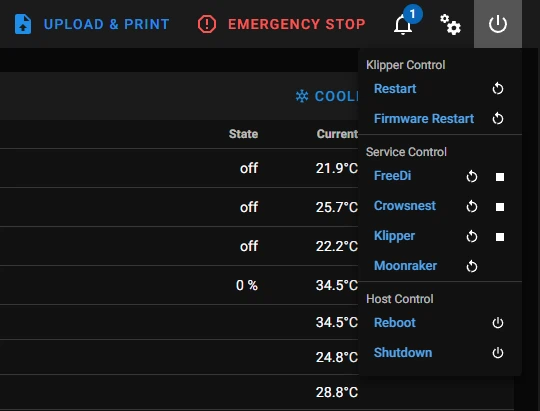
Restart method: Power menu → Restart FreeDi
What it does: Restarts only the display firmware, doesn't affect printing [attached_file:1]
Moonraker Service
Files: moonraker.conf
Restart method: Power menu → Restart Moonraker
What it does: Restarts the web interface backend
Other Services
Files: crowsnest.conf, etc.
Restart method: Power menu → Restart [Service Name]
What it does: Restarts specific features like camera streaming
In Mainsail, you can stop/restart services here:
Configuration Best Practices
Before Editing
Warning
- Understand what you're changing – Read comments, check documentation
- Backup the file – Download a copy before making changes
- Make small changes – Edit one parameter/section at a time for easier troubleshooting
While Editing
Note
- Preserve formatting – Keep indentation and structure consistent
- Add comments – Explain why you made a change
- Check syntax – One typo can prevent Klipper from starting
After Editing
Tip
- Save the file – Don't forget this step!
- Restart the appropriate service – See table in Configuration Files
- Check for errors – Look at Mainsail's console for error messages
- Test the change – Verify that it works as expected
More About Klipper Configuration
FreeDi uses standard Klipper configuration, with some additions for the display only. To learn more about how things work, you can check these links:
Official Klipper Documentation:
- Configuration Reference – Complete list of all configuration options
- Example Configs – Real printers configurations examples
- Klipper G-Codes – Commands you can use in macros
Gcode commands informations:
-
please read this first about Klipper: Klipper Gcode commands
-
you can read about the regular gcode commands here: Regular Gcode commands
FreeDi-Specific:
-
Overview of FreeDi's configuration structure in the next pages.
-
You can have a look at the Advanced Configuration page for more details about FreeDi (for users who know what they're doing so beginners please be careful).