Configuration Files Overview
FreeDi uses multiple configuration files to control your printer. This guide shows you what each file does and how to apply changes.
Tip
Configuration files are read at service startup. After editing, restart the appropriate service for changes to take effect.
New to Klipper? Please read the previous page "Configuration Basics for Beginners" first.
Quick References
| File name | What It Controls | Restart Method |
|---|---|---|
| freedi.cfg | Display behavior & presets | Power icon → Restart FreeDi |
| printer.cfg | Hardware settings | Save & Restart (Klipper) |
| macros.cfg | Automation sequences | Save & Restart (Klipper) |
| moonraker.conf | Web interface backend | Power icon → Restart Moonraker |
| crowsnest.conf | Camera settings | Power icon → Restart Crowsnest |
FreeDi-Specific: freedi.cfg
freedi.cfg:
- What it controls:
- Basic setup parameters for display functionality
- Display settings / preferences like:
- Case light settings and behaviour
- Quick-toggle temperature defaults
- Movement and extrusion step presets
- Home screen preset button names and macros
- etc.
- When to edit: Initial display setup, adjusting temperature presets, or personalizing UI shortcuts and workflow.
- Restart: Power icon → Restart FreeDi (Note: A Klipper restart is not required for these changes)
- Location:
/home/mks/printer_data/config/freedi.cfg
Key difference: Requires FreeDi service restart, NOT Klipper restart.
Info
- Restarting FreeDi doesn't interrupt running prints – it only reloads the display.
How to Apply freedi.cfg Changes
Via Mainsail:
- Edit and save freedi.cfg
- Click Power icon (top-right)
- Find FreeDi under Service Control
- Click restart icon
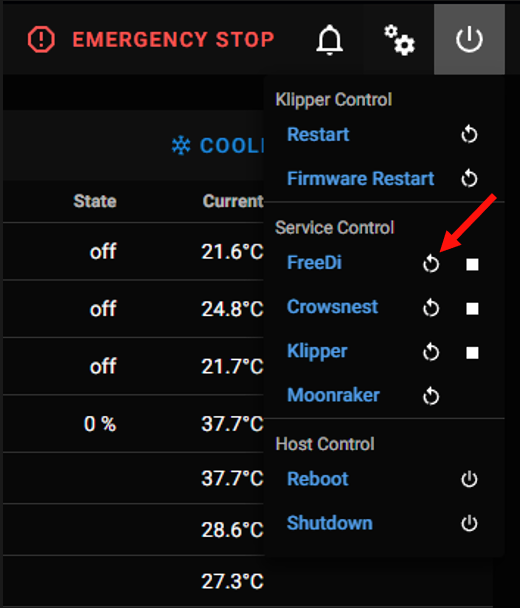
Via SSH:
sudo systemctl restart FreeDi.service
Standard Klipper Files
printer.cfg – Hardware Configuration
printer.cfg:
- What it controls: Stepper motors, sensors (endstops, thermistors, probes), heating elements, bed size, speed/acceleration limits, pin assignments.
- When to edit: Adding hardware, adjusting motion settings, fine-tuning your setup.
- Restart: Save & Restart (Klipper)
- Location:
/home/mks/printer_data/config/printer.cfg
Backup Files & Navigation
You may see multiple files with a date and time suffix:
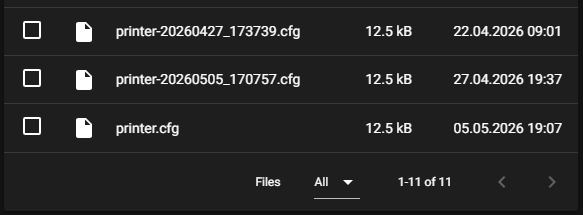
- What they are: These are automatic backups created by Klipper whenever the configuration is overwritten via a
SAVE_CONFIGcommand (e.g., after PID tuning or Bed Leveling). - Usage: Only the file named exactly
printer.cfgis used by your printer. You can safely delete the timestamped versions if they are no longer needed. - Navigation: If you don't see your
printer.cfgin the list, it may have been pushed to the next page. Use the arrow buttons at the bottom right to navigate through your files:
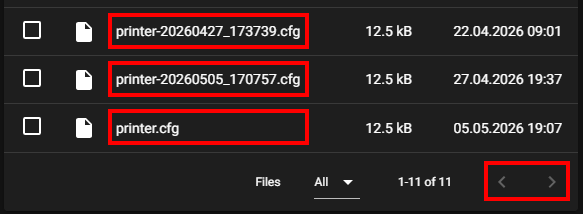
macros.cfg – Automation Sequences
macros.cfg:
- What it controls: Print start/end sequences, filament changes, calibration routines, custom commands.
- When to edit: Customizing print routines, adding automation.
- Restart: Save & Restart (Klipper)
- Location:
/home/mks/printer_data/config/macros.cfg - Why separate? FreeDi splits hardware (printer.cfg) from automation (macros.cfg) for easier updates. Klipper reads both as one file.
moonraker.conf – Web Interface Backend
moonraker.conf:
- What it controls: Mainsail/Fluidd backend, update manager, API access, power controls.
- When to edit: Rarely needed – pre-configured. Edit when adding power devices or remote access.
- Restart: Power icon → Restart Moonraker
- Location:
/home/mks/printer_data/config/moonraker.cfg - Reference: FreeDi moonraker.conf
crowsnest.conf – Camera Settings
crowsnest.conf:
- What it controls: Camera configuration for print monitoring.
- When to edit: Installing or adjusting a camera.
- Restart: Power icon → Restart Crowsnest
- Location:
/home/mks/printer_data/config/crowsnest.cfg - References: FreeDi crowsnest.conf
- See also: Webcam Setup
Model-Specific Configurations
FreeDi maintains optimized configurations in the "config_section" folder on Github:
-
X-Smart3
-
X-Plus3
-
X-Max3
-
Q1 Pro
-
Plus4
Generic files and templates are also available in the repository:
-
Generic files: freedi.cfg, moonraker.conf, crowsnest.conf
-
Templates: Reference for custom configs
File Locations & Access
Location in the system: /home/mks/printer_data/config/
Location in Mainsail:
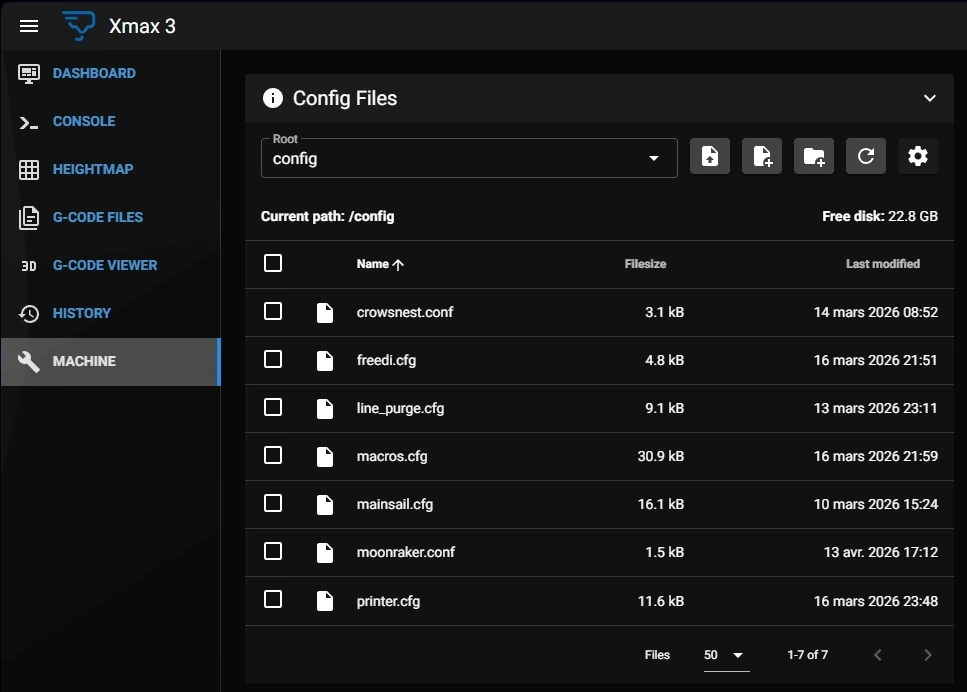
Access via SSH:
cd ~/printer_data/config